
Uniform Particle Trails
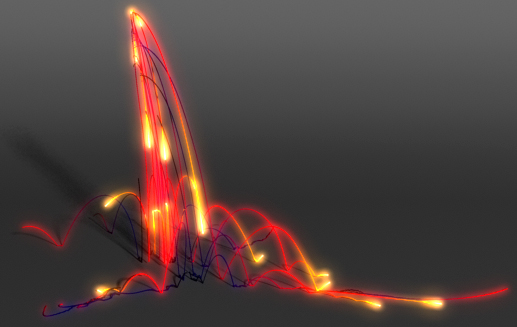
When the task becomes to get smooth lines, trails or flows/streams via particles, most hopes are put upon Blobby Surface or new Output Mesh for nParticles. Both have their own advantages and problems, a mutual one is how to generate a uniform trail – to get smoothest result with smallest amount of particles used.
First decision that comes to mind is to generate particle trails from base particles using standard emitter. Actually, exactly this way trails would be non-uniform – depending on the speed of main particle-generator, sections of it’s trail would consist of different amount of particles, clumps here, breaks there. To eliminate them you’d need to increase blobby radius that’d thicken overall trail etc. Much more efficient method that I’m going to describe in this post – to generate particle trail via particle expression based on distance that basic particle-generator moves per frame and place them uniformly between this two positions.
Actually, this particle expression for basic particle-generator is pretty simple – using position before dynamics/movement in the current frame, position after it, and with respect to user input value of distance between two trail particles (I’ve created scalar float attribute separ for particleShape) to create with emit command the amount of particles we need uniformly placed between these positions. For more thorough explanations of how to get these position values see Before/After Runtime Expressions post (I need to mention that I’m using custom attribute beforePosition here because there’re no collisions in this scene, so lastPosition/worldPosition wouldn’t return the values we expect):
runtimeBeforeDynamics:
beforePosition = position;runtimeAfterDynamics:
string $trail_pt = "trail_pt";
float $separ = separ;

vector $lastPos = beforePosition;
vector $pos = position;
vector $move = <<(($pos.x)-($lastPos.x)), (($pos.y)-($lastPos.y)),
	(($pos.z)-($lastPos.z))>>;

int $num = ceil( mag( $move ) / $separ );

if( $num != 0 ) {
	vector $step = $move / $num;

	for( $i = 1; $i <= $num; $i++ ) {
		vector $newPos = $lastPos + $step*$i;
		emit -o $trail_pt -pos ($newPos.x) ($newPos.y) ($newPos.z);
	}
}
Main particle-generator (red) generates uniform trail of green particles behind:
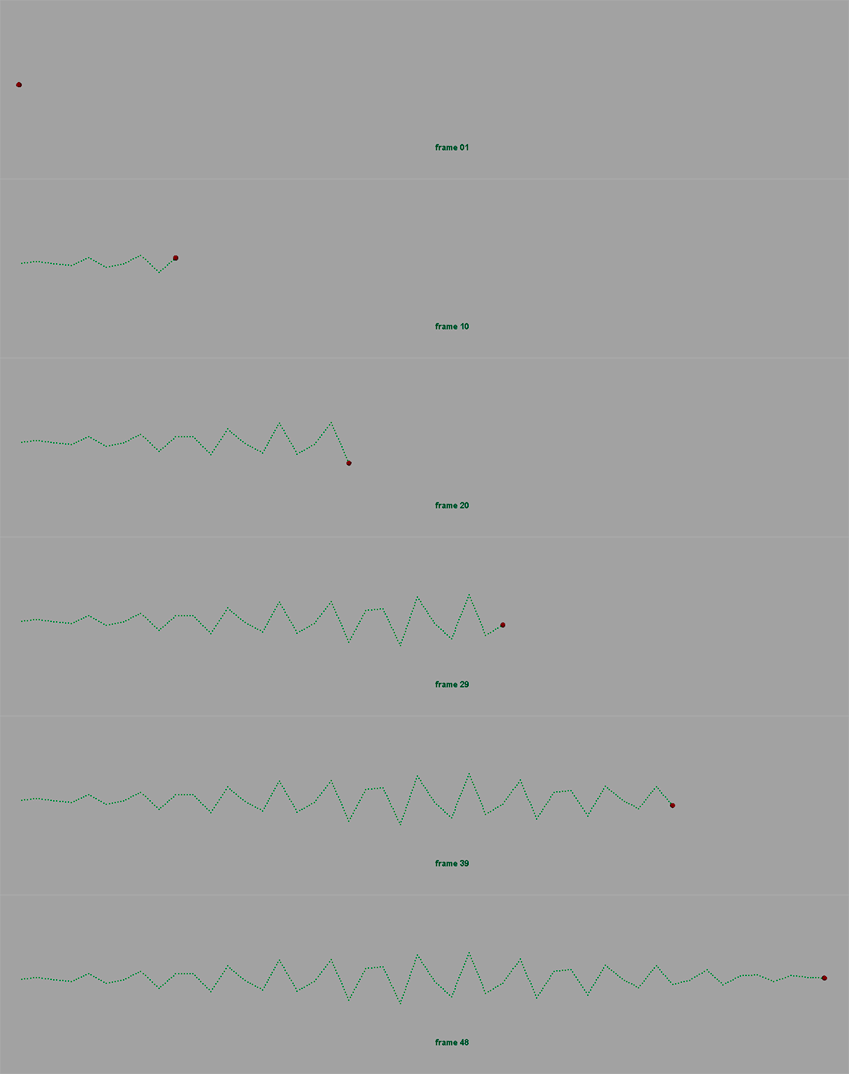
Uniform Particle Trail (Jagged)
Example scene: 05_uniPtTrail_01.mb
Of course if particle moves along smooth trajectory too fast, due to linear interpolation between positions trail would appear broken:
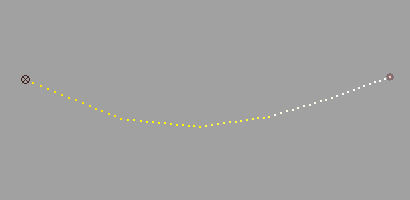
Fast movement of particle-generator causes broken trail
This could be solved with increasing dynamics oversampling (from 1 to 2 in this case):

With increased oversampling trail is smoother
Example scene: 05_uniPtTrail_02.mb
Now it seems that everything is as it should be and we can simulate our particles and generate trails from them… One more issue appears when we apply dynamic forces or age-based ramps to trail itself. In this scene trail_pt is affected by gravity – smooth at creation arcs fall towards the ground in some sort of chunks (upper part of the following image). So, where do they come from and how to get rid of them (lower part):
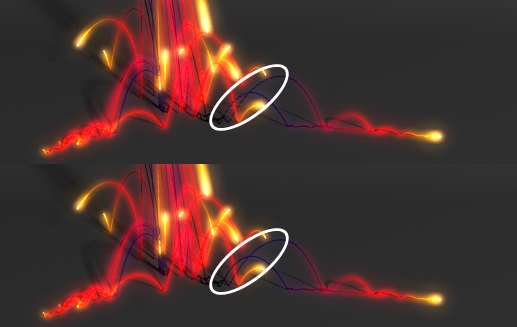
Forces affect trail particles in chunks
If we look closely to the differences between these chunks of particles, it becomes clear that particles in each of them were created at a time – birthTime and as a result age are exactly the same for them:
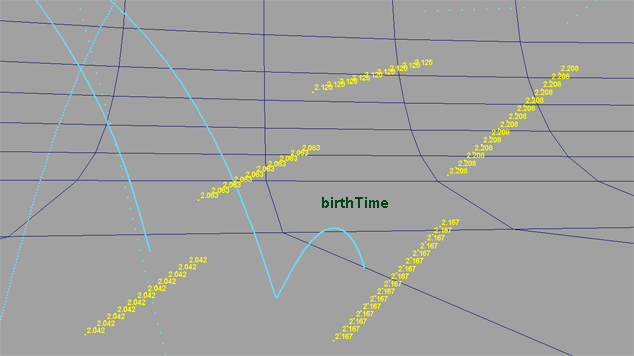
Trail particles are chunked by birthTime values
So, when dynamics are applied, particles generated in the same frame receive the same modifications and in this case fall down chunked. The solution is to define birthTime value along with generation in expression, so that each trail particle have a smooth increment that blends all chunk with neighboring ones:
[...]
	for( $i = 1; $i <= $num; $i++ ) {
		vector $newPos = $lastPos + $step*$i;
		float $life = time - (1.0/24/$num * ($num-$i));
		emit -o $trail_pt -pos ($newPos.x) ($newPos.y) ($newPos.z)
			-at "birthTime" -fv $life;
	}
[...]
After correcting birthTime, age gets corrected also. As a result – dynamic forces and age-based ramps have a smooth impact when moving from chunk to chunk:
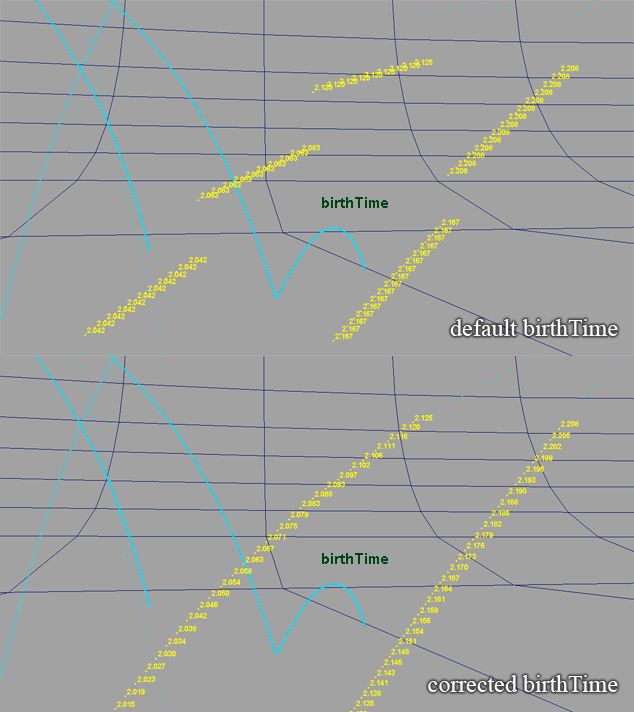
Corrected birthTime smoothes trails
Arcs and their colors become smooth:
Example scene: 05_uniPtTrail_03.mb
In: FX · Tagged with: age, birthTime, blobby, emit, expression, maya, oversampling, particle attribute, particle trail, particles
on 4 September 2009 at 13:34
Permalink
Simply great and very imformative!! thanks a tons
on 24 September 2009 at 5:36
Permalink
This is great. Exactly what I was looking for too. The problem I’ve been having is creating a smooth contrail like emission from the wing tips on a plane moving at a high rate. I’ll check this out and link back if this works for my scene.
Thanks for posting this!
on 19 February 2010 at 12:31
Permalink
Hey man thanks a lot for the tut, its great information. i was wondering if you could help explain a little more what these two lines of code do and why you are using the equations that you are? I kind of understand, but I’m not completely sure yet. Thanks.
int $num = ceil( mag( $move ) / $separ );
and
float $life = time – (1.0/24/$num * ($num-$i));
on 20 February 2010 at 0:33
Permalink
The first one calculates the number of particles that needs to be generated between two positions of a master one. I find the distance between these two positions – magnitude of the vector of transformation – and divide it by user defined $separ (that’s like density of particles in the trail – a distance we want between a pair). Since this division almost never leaves a whole number, I’ve decided that one more particle is better than one less 😉 so it’s ceil here. Then in the $step variable the final distance between these particular two positions is calculated – it’s like $separ adapted for the distance in current step. As a result that makes sections of the trail a little bit uneven (some have denser particles), but I believe in the end that’s better than gaps around each master-particle position.
Second one is easier to write than to explain 🙂 Since I’ve got a bunch of particles born at the exactly same time, I want to fool them that they were born consistently in time from last frame to this frame to make forces affect them accordingly. So, I take the number of particles I generate in current step and find the time delta needed for each one depending on the current fps to evenly stretch in time – 1/24/$num (that’s actually should be 1/$fps/$num to make it more generalized). Then since I generate particles “from the past towards now”, I subtract this delta multiplied by the inverse number of the particle from current time. That creates them with birthTime gradually from previous time to current.
Hope that was understandable 🙂
on 8 April 2010 at 16:06
Permalink
Thank you very much for this high level tutorial Sagroth! Its a great contributrion and very appreciated.
About your last post, yes, it´s clearly understandable what the script does in terms of birthTime and for lifespan related ramps, this works fine. I´m using Maya2009 right now and i got the problem, that with fields (tested gravity and uniform), i still get the “chunk” drop. I guess we need to add the trick to active the field per particle a short amount of time after its creation.
on 9 April 2010 at 22:14
Permalink
You can access the magnitude of a specific field via .inputForce[#] attribute. More details in another thread here about the checking particle presence in a volume. Hence you can set the magnitude precisely for each particle when you create it, just like birthTime. That all is becoming pretty tricky though. That’s strange birthTime doesn’t work for you ’cause it does just that – modifies the magnitude of forces. Trails in my example are falling with gravity also.
on 15 October 2013 at 16:08
Permalink
Thank you! I’m going to use your script to visualize a few things. Very cool!
on 11 October 2014 at 19:44
Permalink
Any chance this can somehow work with Maya Fluids correctly?
I was hoping emission would work from these ‘substepped’ particles without having to actually sim the fluids at .2, etc…. but alas Fluids does not recognize the extra particles…
on 25 June 2015 at 8:44
Permalink
Hi there, thanks so much for this – very useful. I’m trying to make this work using a softbody to drive the emitting particles – but having no luck. the emitted particles are offset all over the place. essentially im trying to direct the movement of the trails explicitly (without fields or expressions). ideally i’d do this just by animating an emitter, but this approach doesn’t seem to work that way.
do you have any thoughts about why this wouldn’t work? I may just be missing something obvious. many thanks
on 12 January 2016 at 17:37
Permalink
Thanks helps alot,!!!!!
on 25 March 2016 at 18:51
Permalink
I can confirm that the correction for the forces being evaluated in chunks doesn’t work in Maya 2015 and 2016, legacy Particles or nParticles.
Even if you use a normal emitter moving fast, which has the birthTime set properly by default, the forces will be applied per frame, resulting in chunks :/
This is slowly driving me crazy.
on 26 March 2016 at 22:21
Permalink
Increasing old ‘Over Samples’ seems to help (nCache>Edit Oversampling or Cache Settings…), but definitely might slow things down.
on 27 March 2016 at 11:48
Permalink
You might have forgotten to explain the gradient > arrayMapper > gravity_magnitude, or perhaps thought it was irrelevant, but THAT’s the magic that gets rid of the chunks in your scene, not the birthTime alone 🙂
Please give this a read: http://unaimb.blogspot.co.uk/2016/03/fixing-maya-particle-dynamics.html
Thanks!