
Convert Instancer into geometry
Type: Python Script (py)
Name: sag_instancerToGeometry
Version: 1.4
Released: 2012.05.05
NEW REWORKED VERSION IS CALLED ark_instToGeo AND AVAILABLE HERE
v1.4
- corrected GUI for older maya versions

v1.3:
- doesn't set visibility to off prior to the starting frame of conversion
- doesn't pay attention to 'start from current frame' if custom range is defined

v1.2:
- reworked GUI
- uses long names correctly (no problems with objects of the same name anymore)
- doesn't freeze source objects' rotations or error if channels have keyframes
- keeps input connections for instances also
- works with different rotation orders of source objects and instancer itself
- each baked object is inside it's own group which actually gets all keyframes
- works with any linear units of the scene (switches to cm and back, actually)

v1.1:
- duplicates now maintain original input connections
- only translate, rotate, scale and visibility are keyframed now
Almost every time I use instancer to duplicate geometry via particles, I inevitably want to convert it’s result into standard keyframed objects to modify or simply delete specific ones.
At last I’ve put myself together and have written a tool for this task.
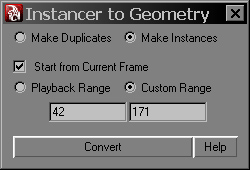
Usage:
- put sag_instancerToGeometry.py into any Maya scripts folder;
- execute python-script:
from sag_instancerToGeometry import *
sag_instancerToGeometry()- select instancer(s) you want to convert and press Convert button in tool’s window. Conversion, static channels deletion and application of euler filter will take place.
Options:
Make Duplicates/Instances – in the first case all created objects will be independent duplicates, in the second one – they will be instances of the original object (the one plugged into instancer);
Start from Current Frame – if enabled, no matter what playback range is set to and whether custom range is enabled or not, conversion will start from the current frame;
Playback/Custom Range – in the first case conversion framerange will be taken from playback range, in the second one – you can enter custom start/end frames;
Convert – […this description was so long and intricate, that it was removed by the editor…]
Help – link to this page.
Notes:
Of course, there’re some limitations and arrears… Right now I can list these:
- rotations can be converted only from Rotation channel of instancer, Aim channels don’t get evaluated and right now I don’t think they will be at all, since the most often used orientation by velocity could be easily done via expression for the same Rotation channel, e.g.:
float $vel[] = velocity;
float $ang[] = `angleBetween -euler -v1 1 0 0 -v2 $vel[0] $vel[1] $vel[2]`;
rotPP = <<$ang[0], $ang[1], $ang[2]>>;- if an instancer channel is mapped to a “weird” attribute, that can’t be easily read – script would fail. At this point I can’t imagine why anyone would want to do this, though during the tests I’ve encountered that someone had set Scale to Ramp Velocity and my tool couldn’t read it. Possibly some useful attributes can cause problems, but that’s what updates are for.
- for proper rotations with respect to different rotationOrder types, tool has to freeze rotate channels of objects plugged into instancer. As a result, if they are driven by animation curves or expressions, or just locked – script would fail. I don’t see any point in rotating these original objects instead of doing this rotations via particle attributes as it’s meant to be done, so I didn’t bother solving this issue.
So, try it, use it and send me bugReports/toDo’s – I’ll try to correct/implement them.
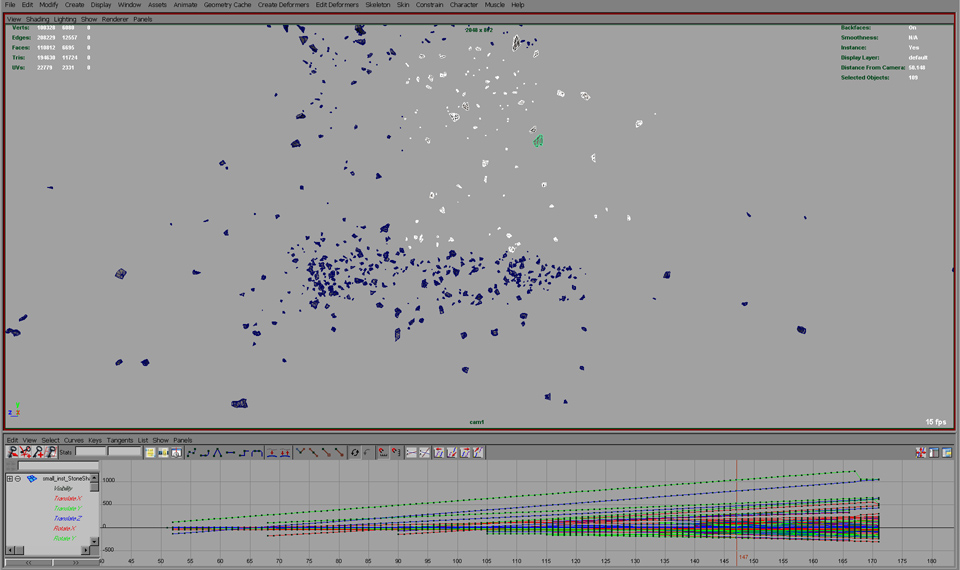
Several Instancers Converted into Geometry Simultaneously
In: FX · Tagged with: instancer, maya, particles, python, sag_instancerToGeometry, script, tool, utility
on 5 May 2016 at 22:46
Permalink
Thanks! Worked like a charm for my very simple nParticle sim. I can not believe Maya does not have this capability on it’s own. It’s maddening, and makes me so happy that I’ve been working more in Houdini these days.
Thanks again for this script that got me out of a bind!
on 7 December 2016 at 18:17
Permalink
Hi there,
It would be a great script only if I could make it work. Ihave copied the python script into several folders now, but none of them seems to be picked up by the script. I get an error message stating:
# Error: line 1: ImportError: file line 1: No module named sag_instancerToGeometry #
What do I do now?
on 8 December 2016 at 11:33
Permalink
Hi, Peter. Check your PYTHONPATH environment variable (“getenv PYTHONPATH;” mel command in maya) – maya checks these folders for scripts. Otherwise just copy/paste the whole script to your scriptEditor, execute it and “sag_instancerToGeometry()”.
on 9 December 2016 at 11:01
Permalink
Hi Ark,
Thank you very much for the help. It works great. Pipeline have modified paths getting checked quite drastically. I am going to implement this to ours now. Thanks again.
Peter
on 9 December 2016 at 18:21
Permalink
You’re welcome. This old version doesn’t work with namespaces though, Maya just freezes… It’s fixed, but I forget to update the tool for a very long time already – I’ll try to do that asap.
on 22 June 2017 at 16:19
Permalink
Hi Ark
Does this script recognize lifespan. Other scripts I’ve tried don’t seem to do it.
Keith
on 22 June 2017 at 16:59
Permalink
Hi Keith. If a particle disappears for any reason (including lifespan), the converted object becomes invisible with a key to it’s visibility.
on 24 February 2019 at 8:52
Permalink
Thanks for the post.Thanks Again. Cool.
on 24 October 2019 at 13:06
Permalink
Hello and thank you so much for writing this script, genius!
I’ve used it in the past twice with perfect results. Right now tho my instanced particles are solved with the script into a perfect and huge sphere. Like all the instanced geo particles a stuck to this sphere.
Does anyone know what’s going on here?
thanks for any assistance!