
Конверсия Instancer’а в геометрию
Type: Python Script (py)
Name: sag_instancerToGeometry
Version: 1.4
Released: 2012.05.05
NEW REWORKED VERSION IS CALLED ark_instToGeo AND AVAILABLE HERE
v1.4
- corrected GUI for older maya versions

v1.3:
- doesn't set visibility to off prior to the starting frame of conversion
- doesn't pay attention to 'start from current frame' if custom range is defined

v1.2:
- reworked GUI
- uses long names correctly (no problems with objects of the same name anymore)
- doesn't freeze source objects' rotations or error if channels have keyframes
- keeps input connections for instances also
- works with different rotation orders of source objects and instancer itself
- each baked object is inside it's own group which actually gets all keyframes
- works with any linear units of the scene (switches to cm and back, actually)

v1.1:
- duplicates now maintain original input connections
- only translate, rotate, scale and visibility are keyframed now
Практически каждый раз когда использую instancer для размножения геометрии по частицам, в итоге неминуемо хочется перевести полученный результат в обычные объекты с ключевой анимацией, дабы подправить отдельные из них или удалить вовсе.
Вот наконец-то собрался и написал утилиту для решения этой задачи.
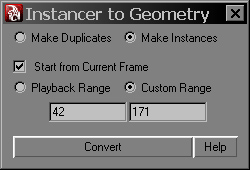
Использование:
- файл sag_instancerToGeometry.py надо положить в любую папку, откуда Maya читает скрипты;
- запустить python-скрипт:
from sag_instancerToGeometry import *
sag_instancerToGeometry()- выделить instancer‘ы, которые нужно сконвертировать и нажать Convert в окне утилиты. Будет произведена конвертация, удаление static channels и применен euler filter.
Опции:
Make Duplicates/Instances – в первом случае созданные объекты будут независимыми дубликатами, во втором – инстансами от исходного объекта (который воткнут в instancer);
Start from Current Frame – если включено, вне зависимости от таймлайна или выставленного вручную диапазона фреймов, начнет конвертацию с текущего фрейма;
Playback/Custom Range – в первом случае диапазон фреймов будет взят из таймлайна, во втором – можно ввести значения начального и конечного фрейма;
Convert – […описание оказалось столь длинным и замороченным, что было удалено редактором…]
Help – линк на эту страницу.
Примечания:
Разумеется, есть ряд ограничений и попросту недоработок… Из тех что могу сейчас отметить:
- вращения конвертятся только из канала Rotation instancer‘а, всякие Aim я пока не учитывал и пока даже не знаю буду ли вообще, потому как в принципе наиболее используемую ориентацию объектов по velocity можно легко написать экспрешеном в тот же Rotation, к примеру:
float $vel[] = velocity;
float $ang[] = `angleBetween -euler -v1 1 0 0 -v2 $vel[0] $vel[1] $vel[2]`;
rotPP = <<$ang[0], $ang[1], $ang[2]>>;- если на какой-то из каналов instancer‘а назначен “необычный” атрибут, который не получится прочитать – скрипт работать не будет. На данный момент я не могу себе представить зачем кто-то будет такое делать, хотя в ходе тестов столкнулся с тем, что некто поставил на Scale атрибут Ramp Velocity и тот не читался утилитой. Вероятно могут быть проблемы с какими-то полезными атрибутами, так что тут как раз возможность для апдейтов.
- для правильной передачи вращений с учетом разных rotationOrder приходится фризить rotate каналы воткнутых в instancer объектов. Соответственно, если они проанимированы ключами или экспрешеном, или попросту залочены – скрипт завалится. Смысла крутить исходный объект вместо того чтобы крутить как полагается партикловыми экспрешенами лично я не вижу, поэтому этот нюанс тоже не решался.
В общем, пробуйте, пользуйтесь и пишите багРепорты/пожелания – я постараюсь их исправить/добавить.
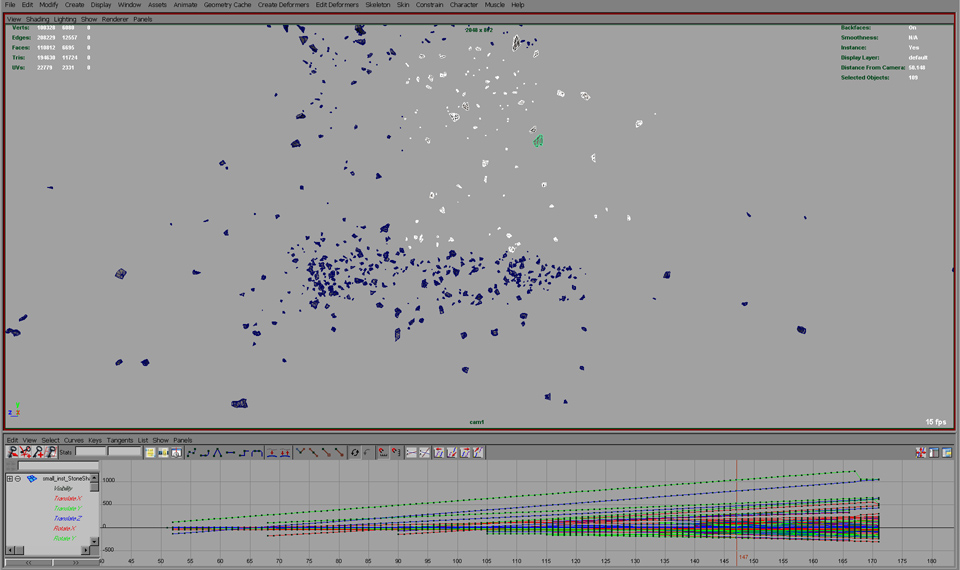
Several Instancers Converted into Geometry Simultaneously
In: FX · Tagged with: instancer, maya, particles, python, sag_instancerToGeometry, script, tool, utility
on 5 May 2016 at 22:46
Permalink
Thanks! Worked like a charm for my very simple nParticle sim. I can not believe Maya does not have this capability on it’s own. It’s maddening, and makes me so happy that I’ve been working more in Houdini these days.
Thanks again for this script that got me out of a bind!
on 7 December 2016 at 18:17
Permalink
Hi there,
It would be a great script only if I could make it work. Ihave copied the python script into several folders now, but none of them seems to be picked up by the script. I get an error message stating:
# Error: line 1: ImportError: file line 1: No module named sag_instancerToGeometry #
What do I do now?
on 8 December 2016 at 11:33
Permalink
Hi, Peter. Check your PYTHONPATH environment variable (“getenv PYTHONPATH;” mel command in maya) – maya checks these folders for scripts. Otherwise just copy/paste the whole script to your scriptEditor, execute it and “sag_instancerToGeometry()”.
on 9 December 2016 at 11:01
Permalink
Hi Ark,
Thank you very much for the help. It works great. Pipeline have modified paths getting checked quite drastically. I am going to implement this to ours now. Thanks again.
Peter
on 9 December 2016 at 18:21
Permalink
You’re welcome. This old version doesn’t work with namespaces though, Maya just freezes… It’s fixed, but I forget to update the tool for a very long time already – I’ll try to do that asap.
on 22 June 2017 at 16:19
Permalink
Hi Ark
Does this script recognize lifespan. Other scripts I’ve tried don’t seem to do it.
Keith
on 22 June 2017 at 16:59
Permalink
Hi Keith. If a particle disappears for any reason (including lifespan), the converted object becomes invisible with a key to it’s visibility.
on 24 February 2019 at 8:52
Permalink
Thanks for the post.Thanks Again. Cool.
on 24 October 2019 at 13:06
Permalink
Hello and thank you so much for writing this script, genius!
I’ve used it in the past twice with perfect results. Right now tho my instanced particles are solved with the script into a perfect and huge sphere. Like all the instanced geo particles a stuck to this sphere.
Does anyone know what’s going on here?
thanks for any assistance!