
Lightmaps & Converting image to another uv space
Этот пост о методах конвертации изображения (текстуры, карты дисплейсмента и т.п.), нарисованного для определенной uv-развертки, в соответствующее изображение для другой uv-развертки того же объекта.
This post is about methods to convert an image (texture, displacement map etc.) made for specific uv-mapping, into corresponding image for another uv-mapping of the same object.
К примеру, сгенеренный дисплейсмент для AUV/GUV маппинга из zBrush надо трансформировать в более “вразумительный” маппинг (загрузка которого в zBrush для перегенерации карты не работает… не спрашивайте, у меня такое было в разгар продакшена ;)) дабы смешать с другой картой дисплейсмента (у mentalray проблемы с дисплейсментом на разных uvSet’ах). Или попросту маппинг объекта изменился, и хочется уже нарисованную под него текстуру проапдейтить. Ну или что-либо еще 🙂
Let’s say, you need to convert a displacement map generated for AUV/GUV mapping of zBrush into more “reasonable” one (loading it into zBrush and regenerating displacement doesn’t work… don’t ask, I had this situation in a midpoint of production ;)) to mix it with displacement for another uvSet (mentalray has problems with multi-uvSet displacement). Or the mapping of the object has changed, and you want to update already painted textures as well. Or something else – you name it 🙂
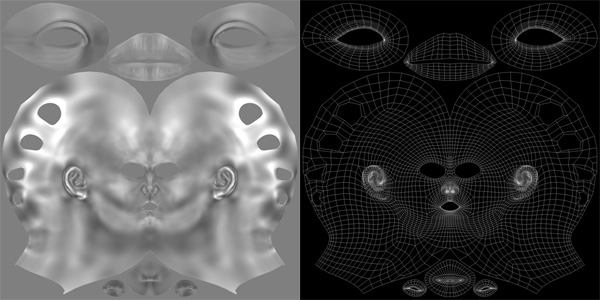
Вот, предположим, дисплейсмент для головы с определенным маппингом. По каким-то причинам мы решили изменить ее маппинг на такой (это, разумеется, совершенно не пример как надо качественно маппить голову ;)):
So, here’s a head displacement map for a specific mapping. For some reasons we’ve decided to change it into this (definitely, this is not a best head uv mapping showcase ;)):
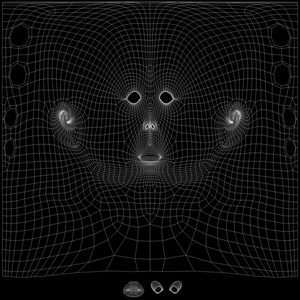
Для конвертации карты нам нужно чтобы оба маппинга были на объекте как разные uvSet’ы (как переносить маппинг с объекта на объект той же или разной топологии/нумерации вершин – отдельная тема, с которой лучше разобраться, ибо всплывает постоянно :)) В данном случае исходная карта для дефолтного map1, а сконвертировать надо в следующий по счету uvSet с именем cyl.
For conversion we need to have both mappings as separate uvSets (how to transfer mapping from one object to another with the same or different topology/vertex order – is another topic you better get familiar with, ’cause this issue appears all the time :)) In this case, original map was made for default map1, and we need to convert it into next uvSet after that (named cyl).
Далее у нас два варианта. Один что называется user-friendly, но медленнее и менее качественный, а второй немного сложнее настроить, но намного качественнее и быстрее. Опишу оба в том же порядке.
Now we have two methods to do the conversion: first one is what we call user-friendly, but it’s slower and produces poorer result; second one is a bit more difficult to setup, but faster and makes better quality. I’ll describe both in the same order.
– Batch Bake (mental ray) –
1) Вешаем на этот объект surfaceShader с конвертируемой картой на том uvSet’е, для которого она нарисована (в данном случае дефолтный map1):
1) Assign to an object a surfaceShader with original map on the uvSet it’s made for (in this case, it’s default map1):
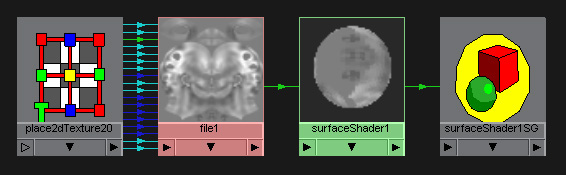
2) Выключаем в настройках рендера все лишнее (finalGather к примеру) и установливаем приличный sampling (от него будет зависеть кол-во артефактов на сконверченном изображении и само время конвертации);
2) Disable everything we don’t need in render settings (finalGather for example) and set an appropriate sampling (it’ll define amount of artifacts in converted image and the time of the conversion itself);
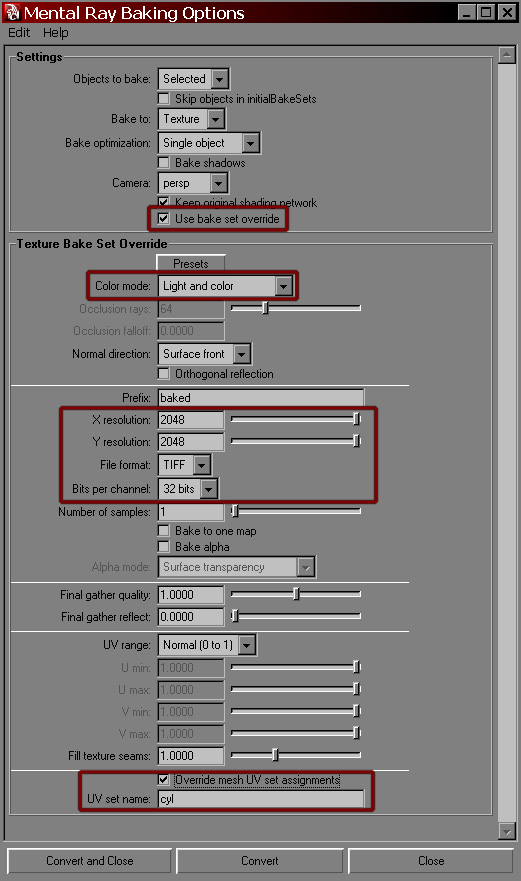
3) Запускаем опции Lighting/Shading > Batch Bake (mental ray), включаем ‘Use bake set override’ и выставляем нужные настройки разрешения, битности и тип файла. Важно включить Color mode: Light and color. В самом низу ‘Override mesh UV set assignments’ позволяет ввести имя uvSet’а, в который мы хотим сконвертить эти Light and color данные, то есть нашу карту:
3) Open options dialog for Lighting/Shading > Batch Bake (mental ray), enable ‘Use bake set override’ and set resolution, bit depth and file format you need. It’s important to set Color mode: Light and color. At the bottom ‘Override mesh UV set assignments’ lets you specify uvSet name you want to convert this Light and color data (i.e. out image map) into:
Запускаем, ждем некоторое время, получаем результат (обычно в mentalray/lightMap папку текущего проекта):
Now run the conversion and wait for the result (usually placed into mentalray/lightMap folder of the current project):
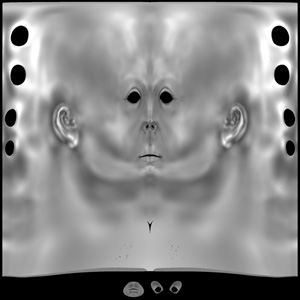
Несмотря на удобство интерфейса и настройки шейдера, время на конверсию этим методом довольно долгое (в моем примере 10 минут), да и карта получилась с артефактами в областях с плотной сеткой:
Despite the user-friendly interface and simplicity of shader network, conversion time via this method is pretty long (10 min in my case), and the resulting map has artifacts in high density areas:
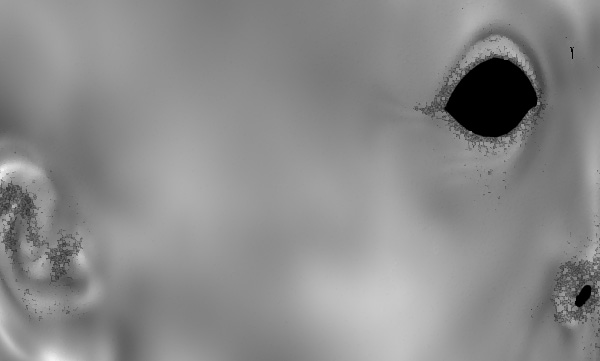
Поэтому перейдем ко второму методу…
So, let’s switch to the second method…
– mib_lightmap_write shader –
1) На объект назначаем surfaceShader без каких либо карт, просто константный материал для минимума калькуляций;
1) Assign surfaceShader without any maps to your object, just constant material to minimize calculations;
2) Опять же, отключаем все лишнее типа finalGather, но в данном случае сэмплинг и т.п. значения не имеют – ставим их низкими, опять же для скорости. На самом деле можно вообще камеру передвинуть в пустоту, чтобы не рендерилось ничего.
2) Once again, disable everything we don’t need like finalGather, but in this case sampling doesn’t matter – set it to low values for the sake of render time. Actually, you can point the camera into empty space to render nothing.
3) К shadingGroup назначенного surfaceShader‘а подключаем mib_lightmap_write (дефолтный коннекшен .message к .miLightMapShader maya сделает сама), в котором надо настроить четыре вещи:
3) Connect mib_lightmap_write shader to shadingGroup of this surfaceShader (maya should do the default connection of .message to .miLightMapShader itself), and set four things there:
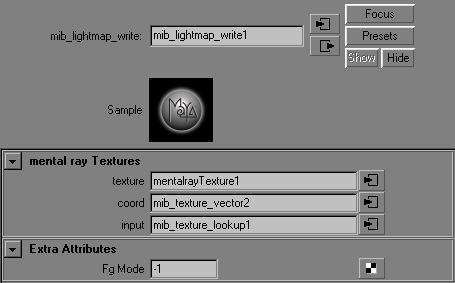
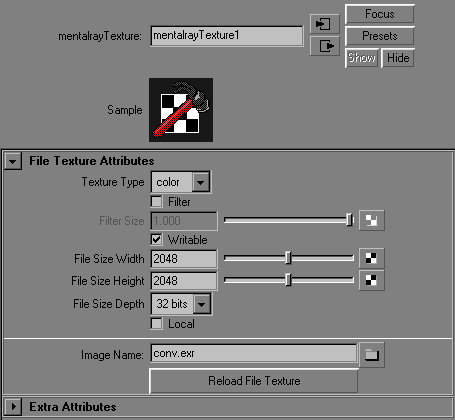
texture: сюда подключаем mentalrayTexture, в которой указываем writable, резолюшен, битность и имя файла, в который будет записан результат (расширение укажет в какой тип файла писать, т.е. при указании .exr файл будет честным openEXR, разве что традиционно без приличной компрессии ;))
texture: connect mentalrayTexture node here, enable writable for it and set resolution, bit depth and the name of the file to store conversion result into (file extension will define the file type, i.e. entering .exr would make this file the actual openEXR type one, though traditionally without reasonable compression ;));
coord: координатные данные, в которые конвертировать изображение. Подключаем mib_texture_vector (через mib_texture_remap если надо повозиться с областями uv пространства), в котором устанавливаем в какой uvSet хотим конвертировать (атрибут select: 0 – указывает на дефолтный map1, 1 – на следующий, наш cyl в данном случае);
coord: coordinates data to convert image into. Plug mib_texture_vector here (through mib_texture_remap if you want to mess with uv regions) and set the target uvSet to convert into (attribute select: 0 – points to default map1, 1 – points to the next one, cyl in this case);
input: собственно, что хотим конвертировать. Надо приконнектить через mib_texture_lookup, в который тыкаем другой mib_texture_vector, но уже разумеется со значением 0 для select (так как исходная карта для дефолтного map1). Саму текстуру можно подключить как из майской file, так и из mentalrayTexture (writable тут уже включать не надо, само собой);
input: actually, that’s what you want to convert. Connect mib_texture_lookup here with another mib_texture_vector in it, which obviously has select set to 0 (since original map is made for default map1). The image itself could be maya file node or mentalrayTexture (with writable turned off this time, of course);
fg_mode: выключаем значением -1;
fg_mode: disable with -1 value;
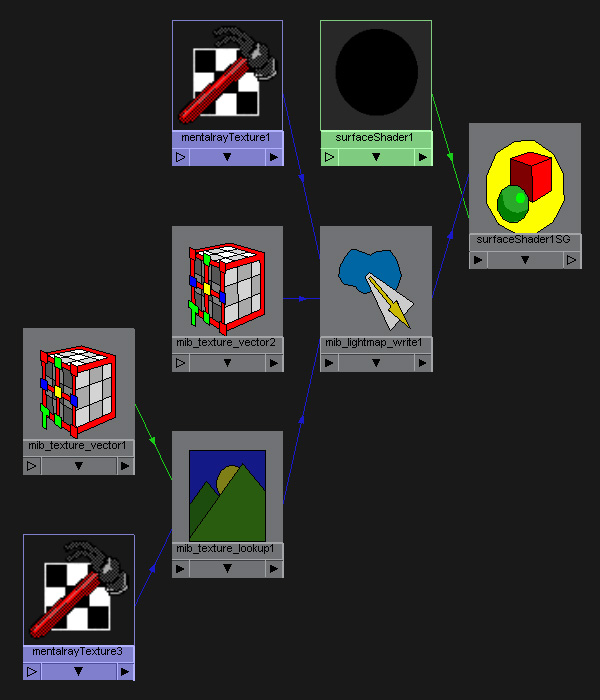
Запускаем рендер (как уже упоминалось – можно пустой), пойдет секция генерации lightmap‘а, в результате которого и получим файл, далее пробежит уже ненужный рендер.
Now render the image (could be blank, as I’ve already mentioned above), lightmap generation will start and make converted file we need, then usual rendering will run though we don’t need it anymore.
Таким методом получаем более качественный результат (артефактов нет) и намного быстрее (6 секунд в данном случае).
Through this method we get better quality result (no artifacts anymore) and much faster (6 sec in my case).
Сцену с этим нетворком прилагаю:
Adding a scene with this network:
In: Render · Tagged with: bake, lightmap, mapping, maya, mentalray, mib_lightmap_write, mib_texture_lookup, mib_texture_remap, mib_texture_vector, perfomance, shading, surfaceShader, texture, uv, uvset
on 13 January 2010 at 16:19
Permalink
Отлично
on 12 May 2010 at 15:12
Permalink
очень интересно!
вопрос: а можно таким способом запечь occlusion, а то черерез Batch Bake (mental ray) уж очень много артефактов, даже с завышенными настройками.
on 12 May 2010 at 22:43
Permalink
Можно запечь что угодно – процедурные текстуры, освещение, отражения и т.п. Окклюжен тоже, только возможно скорость будет не очень. Просто тыкайте в инпут лайтмапа то что нужно запечь (и в mib_texture_vector надо правильный uvSet поставить – скорее всего 0).
on 16 September 2010 at 14:59
Permalink
Спасибо, очень полезный трюк!
Я у вас на сайте давно видел скрипт для фотошопа который добавляет пиксели вокруг текстуры, чтобы заполнить возможные швы при наложении на модель. Подскажите, пожалуйста, где его можно найти.
И кстати очень интересный у вас блог !
on 17 September 2010 at 1:44
Permalink
Спасибо.
Скрипт лежит тут:
http://www.sigillarium.com/_articles/seamExpander.html
но есть подозрение, что он уже давно не работает на новых версиях фотошопа. Как бы то ни было, суть метода в том, чтобы отделить текстуру от фона, продублировать слой, и нижнему дубликату сделать filters>other>maximum, возможно еще удалить один пиксел по краям верхнего.
on 17 September 2010 at 22:37
Permalink
Спасибо за быстрый ответ !
Скрипт замечательно работает в photoshop CS5.
on 17 September 2010 at 23:24
Permalink
Надо будет тогда ту страничку включить в этот блог 🙂
on 16 November 2010 at 13:31
Permalink
спасибо!
on 20 July 2011 at 8:44
Permalink
Хороший граф получается, полезный. Прошу помочь с воей проблемой. Хочу запеч Fluid3DTexture в битмап. С другим битмапом граф работает, кактолько в инпут через mib_texture_lookup подключаю флюидную текстуру, система не работает. Вот ошибка.
// Warning: (Mayatomr.Custom) : mib_texture_lookup1.tex: unsupported parameter connection of type texture to incompatible node fluidTexture3DShape1, ignored //
Видимо предварительно надо флюидную текстуру както конвертнуть. Есть варианты?
on 24 July 2011 at 17:17
Permalink
Если какая-то майская нода не поддерживается, пропустите ее через mib_color_mix (втыкаем в color_0 и ставим num в 1), outValue которого уже втыкайте в input лайтмапа.